![Parsd_logo_new_gray_large.png]](https://support.parsd.com/hs-fs/hubfs/Parsd_logo_new_gray_large.png?height=49&name=Parsd_logo_new_gray_large.png)
Currently, the Parsd app only supports speech-to-text transcription from audio files in .mp3 and .m4a format. However, it is easy to extract the sound from a video file and save it into a supported format that can be imported into the Parsd Digital Research Platform.
Extract sound using Mac OS
Mac OS comes bundled with an app called QuickTime Player.
- Double-click the audio file to open it in QuickTime Player
- Select the "File" (Arkiv) Menu and then "Export as" (Exportera som)
- Choose "Audio Only (Endast Ljud) and save the file with a .m4a extension
Finally, you can now import that file into Parsd for transcription.
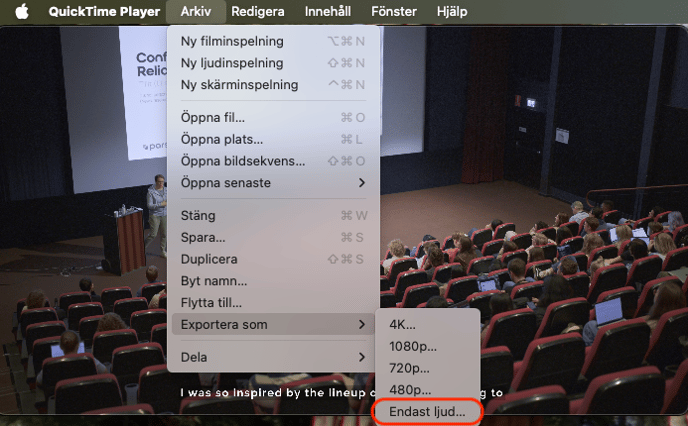
Open in QuickTime Player and choose Export as Sound only.
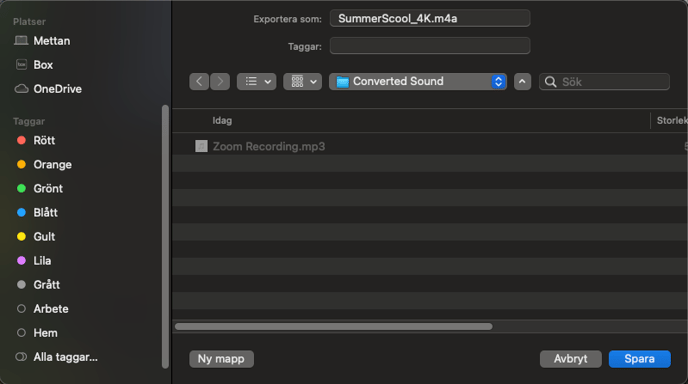
Save the file with a .m4a extension
Extract sound using Windows
If you are using Windows you need to download the open source video player VLC to extract a sound file in .mp3 format from a .mp4 video file. The .mp3 sound file can then be imported into Parsd for transcription in a Knowledge Object.
- Download the VLC Player to your Windows machine
- Open the video file in VLC
- Go to File (Arkiv) and select Convert/Stream (Konvertera/Strömma)
- Drag and drop the video file (or choose from the file explorer)
- Choose Profile "Audio-MP3"
- Choose a location to store the file with a .mp3 file extension.
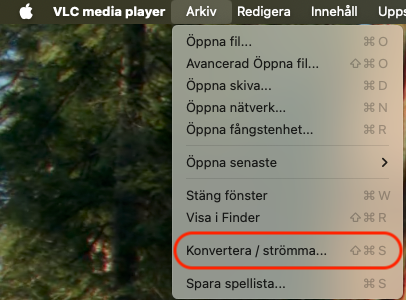
Open VLC Player and select "Convert/Stream" (Konvertera/Strömma)
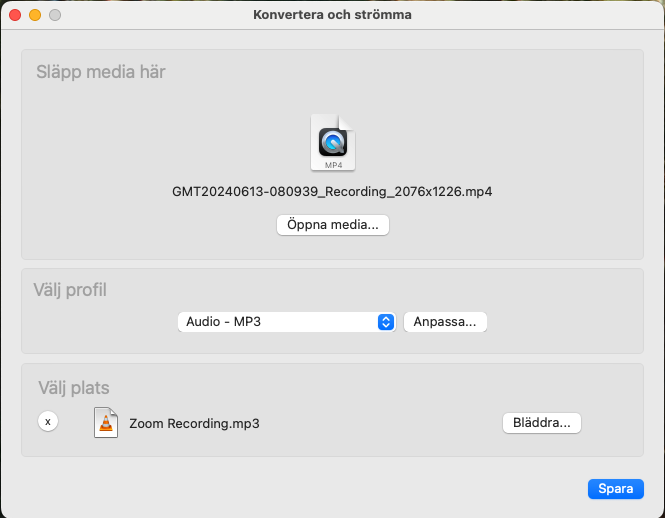
Drag and drop the video file, select the Audio-MP3 profile and choose a location to store the file in with the .mp3 extension.
Finally, you can now import that file into Parsd for transcription.
Please note that if the audio file contains multiple languages, the AI-powered transcription will often work only for the first language identified in the file. If possible, try to cut the audio file into different files for each language.
The Parsd app currently supports transcription in Swedish, English, French, and Russian.