![Parsd_logo_new_gray_large.png]](https://support.parsd.com/hs-fs/hubfs/Parsd_logo_new_gray_large.png?height=49&name=Parsd_logo_new_gray_large.png)
To kick things off when using the AI-powered Project Chat, envision yourself in a conversation with a knowledgeable co-worker or mentor. Ask targeted questions that delve into the perspective or specific details that pique your interest.
Basic concepts explained
- Write full sentences rather than keywords
- Phrase it like a question to get a suggested answer back
- Tone lets you adapt the type of language in the answer
- Output format lets you adapt the format of how you need to deliver your insights
- Refine question will help you find different ways of asking the question
Write a full sentence instead of keywords
When using the AI-powered Project Chat, it's important to craft complete sentences that provide detailed explanations or solutions, rather than just listing keywords without context. Try coming up with specific questions that address your interests or inquiries and try them out in the chat interface to receive more comprehensive and meaningful responses from the AI system, improving the overall effectiveness of your interaction.
Example: What aspects of Sweden's foreign policy have changed since the large-scale war in Ukraine?
Ask a variety of questions to analyze your text from different viewpoints
By asking a variety of questions that probe different angles and perspectives, you can thoroughly analyze your text and gain a comprehensive understanding of the subject matter. Consider approaching the topic from various viewpoints to uncover new insights and perspectives that may not have been initially apparent. This approach improves understanding and saves all interactions in chat history for exploration later.
Click on the "Refine question" button to receive three alternative ways to phrase your question.
Click on the "Refine question" button to receive three alternative ways to phrase your question. This feature allows you to explore different angles and perspectives, helping you to refine and enhance the clarity and effectiveness of your inquiry. By considering multiple ways to phrase your question, you can uncover new insights and approaches that may lead to a more thorough understanding of the topic at hand.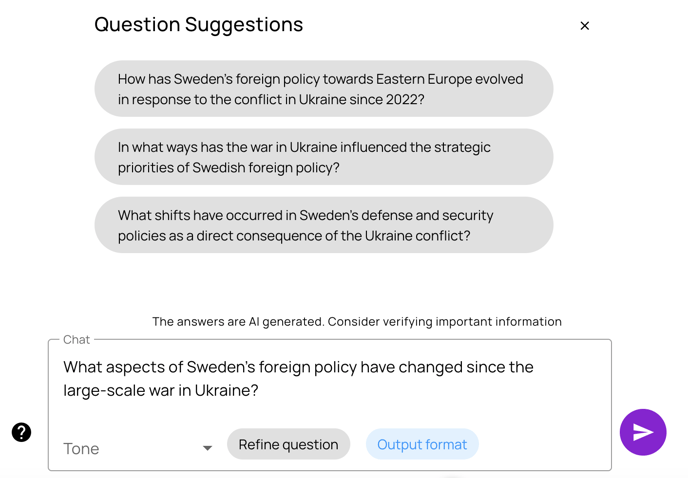
"Output format" lets you adjust the format to a specific delivery channel
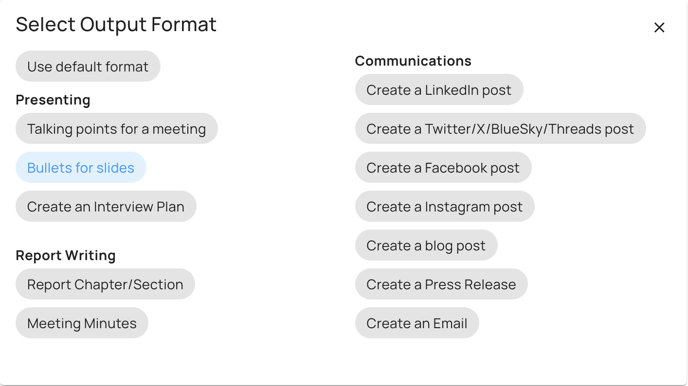
This feature allows you to customize the output for various platforms. For instance, a report chapter format provides a detailed answer that can be compiled into a longer PDF with referenced sources. In contrast, the Instagram format offers a concise and impactful text suitable for social media use.
These are the output formats:
- Presenting - Talking Points for a meeting
- Presenting - Bullets for a slide
- Communications - LinkedIn Post
- Communications - Twitter/X/Bluesky Post
- Communications - Blog Post
- Report Writing - Report Chapter
Use "Tone" to change the writing style of the AI answer
Utilize the "Tone" feature to modify the writing style of the AI-generated responses. This functionality allows you to adjust the language and tone of the answers to match the specific audience or context you are targeting. Whether you need a formal and professional tone for a business presentation or a more casual and conversational tone for social media posts, the "Tone" feature enables you to tailor the AI answers to suit your communication needs effectively. By selecting the appropriate tone, you can ensure that the responses resonate with your audience and convey the information in a manner that is engaging and relevant.
Here are the tones you can select:
- Default
- Professional
- Straightforward
- Humorous
- Casual
- Confident
- Informative
- Inspirational
- Friendly